
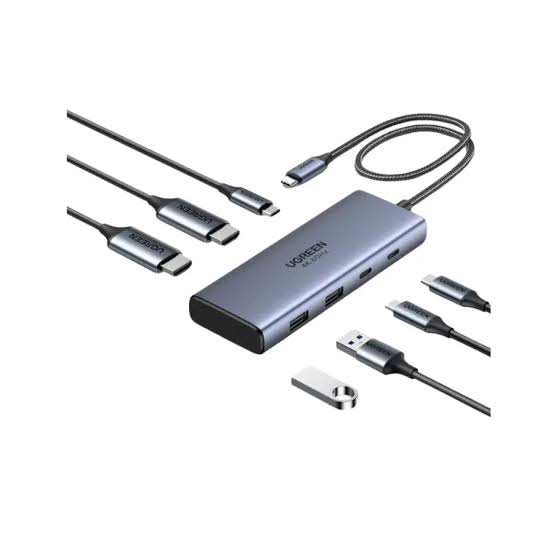
Modern laptops are designed to be lightweight, portable, and powerful, but their compact designs often come with a limitation: fewer connection ports. Many laptops include only a small number of USB-C ports, making it difficult to connect multiple accessories, external displays, storage devices, and other essential equipment USB C hub with 100W PD simultaneously. For professionals, students, remote workers, and technology enthusiasts, these limitations can interrupt daily tasks and reduce productivity.
A USB-C hub featuring 100W Power Delivery offers a practical solution. By expanding connectivity and supporting high-power charging, this compact accessory can transform a laptop into a more versatile workstation. Whether you work from home, attend online meetings, edit creative projects, or manage multiple applications, the right USB-C hub can help simplify your routine and improve your overall computing experience.
Understanding a USB-C Hub with 100W Power Delivery
A USB-C hub is a small device that connects to a laptop through a USB-C port and provides additional connections for compatible peripherals. Depending on the model, these connections may include USB-A ports, HDMI, Ethernet, SD card readers, and additional USB-C ports.
Power Delivery, commonly known as USB-C PD, is a charging technology that allows compatible devices to exchange power through a USB-C connection. A hub advertised with 100W Power Delivery is designed to support a high-power charging input, making it useful for laptops that require substantial charging capacity.
However, the advertised 100W rating does not always mean the laptop receives the full 100W. Some power is used by the hub itself, and the actual output depends on its specifications, the connected power adapter, the cable, and the laptop’s charging requirements.
Understanding these details helps users select a hub that delivers the right combination of connectivity and charging performance.
Keep Your Laptop Charged While Working
One of the biggest advantages of a USB-C hub with 100W Power Delivery is the ability to charge a compatible laptop while using connected accessories. Without this feature, users may need to disconnect their peripherals whenever they want to charge their computer, particularly when the laptop has only one USB-C port.
A power-enabled hub can reduce this inconvenience by allowing the laptop charger to connect to the hub while the hub remains connected to the computer.
This arrangement is particularly helpful for people who spend long hours working at a desk. They can connect their keyboard, mouse, external monitor, and storage devices without constantly switching cables.
Before purchasing, check the hub’s actual power output to the laptop. If your laptop requires a 65W charger, for example, a hub that supplies sufficient power after accounting for its own consumption may be suitable. More demanding laptops may need a higher-wattage adapter or a hub with different specifications.
Expand Connectivity for Everyday Tasks
Limited ports can become frustrating when several devices need to be connected at once. A USB-C hub provides a convenient way to expand a laptop’s connectivity without requiring a separate adapter for every accessory.
Connect Multiple USB Devices
USB-A ports allow users to connect familiar accessories such as wired keyboards, mice, USB flash drives, printers, and other compatible equipment. Some hubs also include additional USB-C data ports for newer accessories.
Having these connections available in one place makes it easier to organize a workstation and switch between tasks. Instead of searching for individual adapters, users can connect their everyday devices to a single hub.
Port speeds vary between models, so check the specifications if you regularly transfer large files or use high-speed external storage.
Add an External Monitor
An HDMI port can make it possible to connect a compatible laptop to an external monitor, television, or projector. A larger display can improve productivity by providing more room for documents, spreadsheets, video calls, and research materials.
For example, a student might keep lecture notes open on one screen while writing an assignment on another. A professional could monitor a spreadsheet while preparing a presentation, reducing the need to switch repeatedly between windows.
Before connecting a display, verify the hub’s supported resolution and refresh rate, as well as your laptop’s video output capabilities. Some USB-C ports support video output, while others are limited to data and charging.
Transfer Files More Conveniently
An SD or microSD card reader can be useful for photographers, videographers, designers, and anyone who regularly works with removable storage. Instead of purchasing a separate reader, users can access compatible memory cards through their hub.
Ethernet connectivity, when available, provides another useful option. A wired network connection may offer more consistent connectivity than Wi-Fi in environments where wireless signals are weak or crowded.
These features make a well-equipped hub valuable for both everyday office work and specialized creative tasks.
Create a More Organized Workspace
A productive workspace should make important tools easy to access. When a laptop is connected to numerous individual adapters, cables can quickly become tangled, and the desk may feel cluttered.
A USB-C hub combines several connections into one compact accessory. Users can connect their most frequently used devices to the hub and manage the setup through a single connection to the laptop.
This arrangement is especially useful for people who regularly move between different work environments. A home office can have a monitor, keyboard, mouse, and network cable connected permanently, allowing the laptop to be attached quickly at the beginning of a work session.
Portability is another benefit. Many hubs are small enough to fit inside a laptop bag, making them convenient for students, business travelers, and remote workers.
Improve Productivity for Different Users
A USB-C hub with 100W Power Delivery can support different workflows depending on the user’s needs.
For Remote Workers and Professionals
Remote workers often use several accessories throughout the day, including webcams, headsets, monitors, and external storage. A hub can help bring these tools together while maintaining a convenient charging arrangement.
Professionals who regularly attend online meetings may appreciate having their essential equipment connected without repeatedly rearranging their desks.
For Students
Students frequently switch between classrooms, libraries, and home study areas. A portable hub makes it easier to connect flash drives, external displays, and other compatible accessories.
When preparing assignments, students can keep research materials visible on a second screen while working in a document on their laptop. This arrangement can support better organization and reduce unnecessary window switching.
For Creative Professionals
Designers, photographers, and video editors may need access to memory cards, external drives, high-resolution monitors, and other peripherals.
A hub with the right data speeds and display support can simplify these connections. However, creative professionals should carefully check specifications because not every hub supports high-bandwidth storage or advanced display configurations.
What to Consider Before Buying a USB-C Hub
Choosing the right hub requires more than looking at its number of ports or advertised charging capacity.
Check Power Delivery Compatibility
Start by identifying your laptop’s charging requirements. Select a hub that supports an appropriate Power Delivery input and provides sufficient output to the laptop after accounting for the hub’s own power consumption.
You may also need a separate USB-C power adapter, as some hubs do not include one.
Review the Available Ports
Make a list of the devices you regularly use. If you need an external monitor, prioritize suitable video output. If you frequently transfer files from cameras, consider an SD card reader. If stable wired networking matters, look for Ethernet connectivity.
Choosing ports based on your actual workflow helps prevent unnecessary spending.
Verify Data Transfer Speeds
USB-C describes a connector type, not a guaranteed transfer speed. Different hubs can support different USB standards and bandwidth levels.
If you regularly work with large video files or external solid-state drives, compare the supported data rates rather than relying only on the USB-C label.
Consider Build Quality and Portability
A good hub should be practical to carry and durable enough for regular use. Check the cable length, connector construction, heat management, and overall design.
A compact model may suit travelers, while a larger hub with more ports may be better for a permanent workstation.
Use Your USB-C Hub Safely and Effectively
To get the most from your hub, connect it according to the manufacturer’s instructions. Use a compatible power adapter and a suitable USB-C cable, particularly when charging a laptop at higher wattages.
Avoid assuming that every USB-C port supports charging, video output, or high-speed data transfer. These capabilities depend on the specifications of the laptop and hub.
If a connected monitor does not work, check video compatibility and supported display settings. If charging is slower than expected, confirm the adapter’s wattage, the hub’s power budget, and the laptop’s requirements.
Keeping the hub’s firmware updated, when applicable, and using reliable accessories can also help maintain stable performance.
Conclusion
A USB-C hub featuring 100W Power Delivery can be a valuable addition to a modern laptop setup. By combining expanded connectivity with convenient charging support, it helps users connect essential peripherals, organize their workspace, and maintain a more efficient daily routine.
From connecting external monitors and storage devices to supporting remote work and academic projects, the right hub can make a laptop more adaptable to different situations. Its real value depends on choosing a model that matches your device’s compatibility, power requirements, data speeds, and connectivity needs.
Before making a purchase, compare the available ports, verify the actual charging output, and confirm that your laptop supports the features you intend to use. With these considerations in mind, a well-selected USB-C hub can simplify everyday computing and help you get more productivity from your existing laptop.